
Cross-Server Setup
Run CobbleRanked across multiple servers with unified rankings and queue.
Share rankings and matchmaking queue across your entire network.
How It Works
CobbleRanked uses a lobby/battle server architecture:
- Lobby Servers - Players join the matchmaking queue from any server in your network
- Battle Server - A dedicated server where all ranked battles take place
- Redis - Synchronizes the queue across all servers in real-time
- Database - Stores rankings, stats, and match history (shared by all servers)
When two players are matched, they are transferred to the battle server via Velocity, complete their battle, and return to their original servers.
Important: Pokemon Data Sync
CobbleRanked does NOT sync Cobblemon Pokemon data between servers. To ensure players have access to the same Pokemon across your network, configure Cobblemon’s built-in MongoDB storage on all servers:
# config/cobblemon/main.conf
storageFormat = "mongodb"
mongoDBConnectionString = "mongodb://your-mongodb-host:27017"
mongoDBDatabaseName = "cobblemon"
All servers must point to the same MongoDB instance so Pokemon data is shared across your network.
See Cobblemon Config Wiki for more details.
CobbleRanked only syncs: Rankings, Match History, Queue State, Season Data
Requirements
| Component | Version | Purpose |
|---|---|---|
| MySQL | 8.0+ | Shared database (Option 1) |
| MongoDB | 6.0+ | Shared database (Option 2) |
| Redis | 6.0+ | Queue synchronization |
| Velocity | 3.4.0+ | Proxy server |
| FabricProxy-Lite | Latest | Required for player transfers |
Architecture
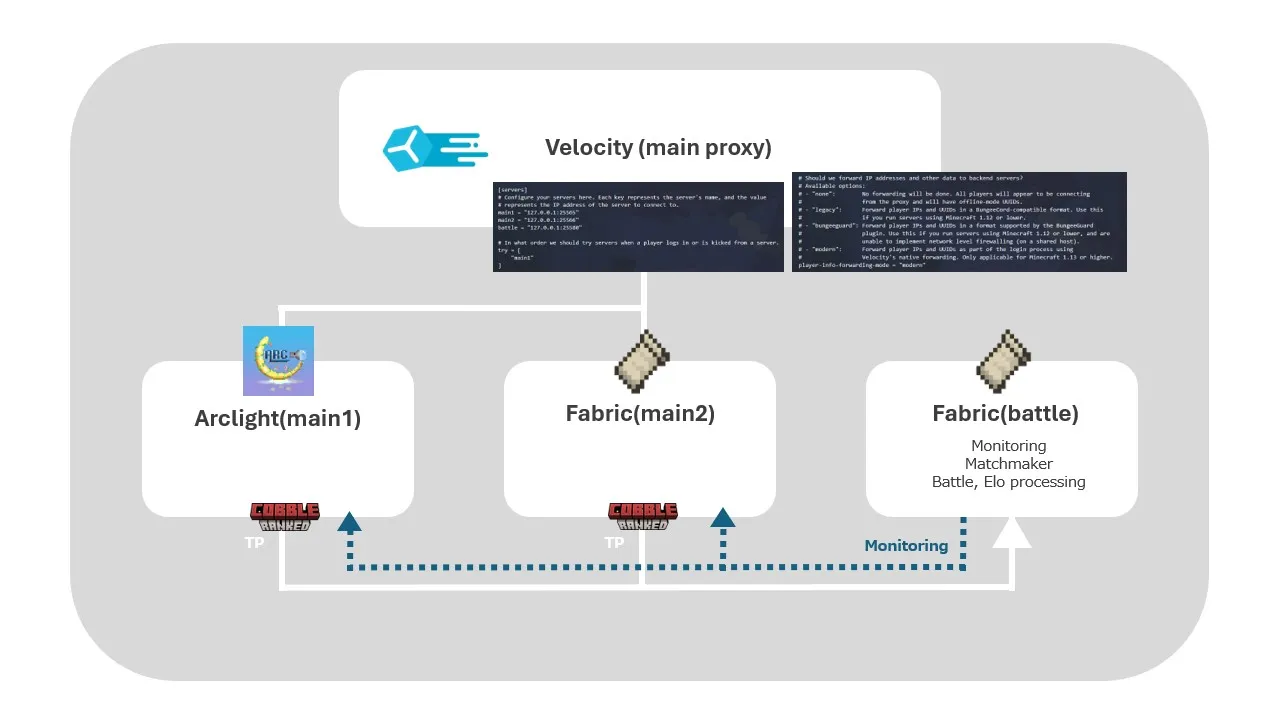
Setup Steps
1. Install Redis
Redis handles real-time queue synchronization between servers.
Linux (Ubuntu/Debian):
sudo apt install redis-server
sudo systemctl start redis-server
sudo systemctl enable redis-server
Docker:
docker run -d -p 6379:6379 --name redis redis:latestVerify Installation:
redis-cli PING
# Should return: PONG
2. Configure Database
All servers must connect to the same database. See Database Configuration for detailed MySQL/MongoDB setup.
3. Configure Battle Server
The battle server is where all ranked battles take place. Only one server should be configured as the battle server.
# config.yaml on Battle Server
crossServer:
  enabled: true
  serverId: "battle"
  battleServer: ""  # Empty string = this IS the battle server

  # Allow players on battle server to join queue directly (NOT RECOMMENDED)
  # Default: false - battle servers should only handle matched battles
  allowQueueOnBattleServer: false

  redis:
    host: "your-redis-host"
    port: 6379
    password: ""
    database: 0
    useSsl: false

  timing:
    matchFoundDelaySeconds: 5
    battleStartDelaySeconds: 10
    playerArrivalTimeoutSeconds: 30

database:
  type: "mysql"  # or "mongodb"

  mysql:
    host: "your-database-host"
    port: 3306
    database: "cobbleranked"
    username: "cobbleranked"
    password: "your_password"
    pool:
      maxSize: 10
      minIdle: 2
4. Configure Lobby Servers
Lobby servers handle queue joining. Players can join the queue from any lobby server.
# config.yaml on Lobby Server
crossServer:
  enabled: true
  serverId: "lobby1"      # Must be unique for each lobby!
  battleServer: "battle"  # Name of the battle server in Velocity

  redis:
    host: "your-redis-host"  # Same as battle server
    port: 6379
    password: ""

database:
  type: "mysql"  # Same as battle server

  mysql:
    host: "your-database-host"  # Same as battle server
    port: 3306
    database: "cobbleranked"
    username: "cobbleranked"
    password: "your_password"
5. Configure Velocity
Add all servers to your velocity.toml:
[servers]
lobby1 = "127.0.0.1:25566"
lobby2 = "127.0.0.1:25567"
battle = "127.0.0.1:25568"

try = ["lobby1"]
Note: The server names in Velocity must match the
serverIdandbattleServervalues in your CobbleRanked configs.
6. Configure FabricProxy-Lite
Install FabricProxy-Lite on all Fabric servers to enable player transfers via the BungeeCord plugin messaging channel.
Requirements:
- FabricProxy-Lite on all Fabric servers
bungeecord: truein Velocity’svelocity.toml(under[advanced])
Server ID Reference
Each server needs a unique serverId. The battleServer field should be empty on the battle server itself, and set to the battle server’s name on lobby servers.
| Server | serverId | battleServer |
|---|---|---|
| Battle Server | battle | "" (empty) |
| Lobby 1 | lobby1 | "battle" |
| Lobby 2 | lobby2 | "battle" |
Player Flow
- Player opens
/rankedon any lobby server - Player joins the matchmaking queue
- Queue state syncs to all servers via Redis
- Match found → Both players transfer to battle server
- Battle completes → Results saved to shared database
- Players return to their original lobby servers
See Also
- Database Configuration - MySQL/MongoDB setup details
- Main Configuration - General settings
- FAQ - Common questions and troubleshooting