Database Configuration
SQLite, MySQL, and MongoDB database setup.
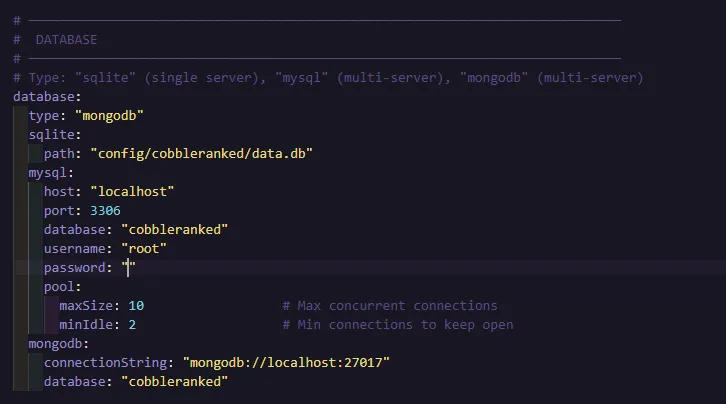
CobbleRanked supports SQLite (default), MySQL, and MongoDB databases. PostgreSQL is not supported.
SQLite (Default)
Zero configuration required. Database auto-creates at config/cobbleranked/data.db.
# config.yaml
database:
  type: "sqlite"

  sqlite:
    path: "config/cobbleranked/data.db"
When to Use SQLite
- Single server
- Small to medium player base
- Simple setup preferred
MySQL
Required for cross-server setups with relational data.
# config.yaml
database:
  type: "mysql"

  mysql:
    host: "localhost"
    port: 3306
    database: "cobbleranked"
    username: "cobbleranked"
    password: "your_password"
    pool:
      maxSize: 10
      minIdle: 2
When to Use MySQL
- Multiple servers sharing rankings
- Large player base (1000+ players)
- Backup and replication needs
MySQL Setup
-
Create database:
CREATE DATABASE cobbleranked; CREATE USER 'cobbleranked'@'%' IDENTIFIED BY 'your_password'; GRANT ALL PRIVILEGES ON cobbleranked.* TO 'cobbleranked'@'%'; FLUSH PRIVILEGES; -
Configure each server with same MySQL credentials
-
Tables auto-create on first start
Connection Pool
CobbleRanked uses HikariCP for efficient connection pooling:
| Setting | Default | Description |
|---|---|---|
maxSize | 10 | Maximum connections |
minIdle | 2 | Minimum idle connections |
MongoDB
Alternative to MySQL for cross-server setups.
# config.yaml
database:
  type: "mongodb"

  mongodb:
    connectionString: "mongodb://localhost:27017"
    database: "cobbleranked"
When to Use MongoDB
- Cross-server with document-based storage
- Already running MongoDB infrastructure
- Flexible schema requirements
MongoDB Setup
- Install MongoDB 6.0+
- Create database (auto-creates on first write)
- Configure connection string
With authentication:
mongodb:
  connectionString: "mongodb://user:password@localhost:27017"
  database: "cobbleranked"
Migration
SQLite to MySQL/MongoDB
- Export SQLite data
- Create new database
- Update config type
- Import data
- Restart server
Backup
SQLite: Copy data.db file
MySQL:
mysqldump -u cobbleranked -p cobbleranked > backup.sqlMongoDB:
mongodump --db cobbleranked --out backup/Database Schema
Tables auto-create on first start. For advanced users who want to query or modify data directly.
Player Stats Table
player_stats (
    uuid VARCHAR(36) PRIMARY KEY,
    total_matches INT,
    total_wins INT,
    last_played_at BIGINT
)
Format Stats Table
Per-format statistics for each player:
format_stats (
    uuid VARCHAR(36),
    format VARCHAR(32),
    season_name VARCHAR(64),
    elo INT,
    highest_elo INT DEFAULT 1000,
    rd DOUBLE,
    volatility DOUBLE,
    matches INT,
    wins INT,
    current_streak INT,
    best_streak INT,
    flee_count INT,
    PRIMARY KEY (uuid, format, season_name)
)
Seasons Table
seasons (
    id INTEGER PRIMARY KEY,
    name VARCHAR(64) UNIQUE,
    start_date DATE,
    end_date DATE,
    is_active BOOLEAN
)
Pending Rewards Table
Rewards awaiting claim via MailLib:
pending_rewards (
    id VARCHAR(128) PRIMARY KEY,
    uuid VARCHAR(36),
    season_name VARCHAR(64),
    reward_type VARCHAR(32),
    commands TEXT,
    claimed BOOLEAN
)
Player Missions Table
Daily/weekly mission progress:
player_missions (
    uuid VARCHAR(36),
    mission_id VARCHAR(64),
    progress INT,
    completed BOOLEAN,
    claimed BOOLEAN,
    current_streak INT,
    last_reset_at BIGINT,
    PRIMARY KEY (uuid, mission_id)
)
Claimed Milestones Table
Track which milestones players have claimed:
claimed_milestones (
    uuid VARCHAR(36),
    milestone_id VARCHAR(64),
    claimed_at BIGINT,
    PRIMARY KEY (uuid, milestone_id)
)
Battle Records Table
Battle snapshots for usage stats:
battle_records (
    id INTEGER PRIMARY KEY,
    season_name VARCHAR(64),
    format VARCHAR(32),
    elo_tier INT,
    timestamp BIGINT,
    pokemon_json TEXT
)
📝 Index:
battle_recordshas an index on(season_name, format, elo_tier)for efficient usage stat queries.
Building Web Applications
CobbleRanked does not include a built-in web API server. For building external websites and APIs, see API & Integration for code examples and security guidelines.
See Also
- API & Integration - Web application examples
- Cross-Server Setup - Multi-server configuration
- Main Configuration - General settings