Quick Start
The shortest path to your first ranked battle.
Start in 3 minutes
If you haven’t installed yet, finish Installation first. This page picks up once the mod is on the server.
Step 1. Start the server
Drop the mods into mods/ and boot up. Config files generate on their own, and the defaults are ready to play right away.
Step 2. Set up one arena
You need at least one arena. Stand where each player should be and register it:
/rankedadmin arena create arena1 pos1     # player 1's spot
/rankedadmin arena create arena1 pos2     # player 2's spot
/rankedadmin arena create arena1 exit     # where to send players after the battle
Full details in Arena Setup.
Step 3. Open the menu
In chat, type:
/rankedThe ranked menu opens with the player’s rating, the leaderboard, and a Join Queue button.
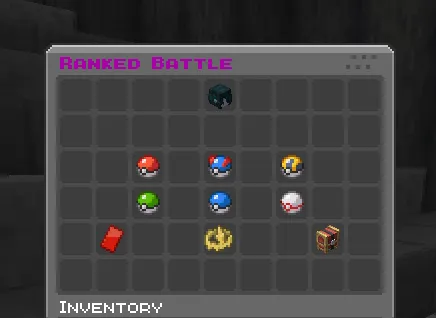
Step 4. Join the queue
Click Join Queue for the format you want (Singles, Doubles, or Triples). The server looks for an opponent at a similar rating.
Step 5. Match, then battle
A “Match Found!” prompt appears when someone’s found. Click Ready, get teleported to the arena, and the battle starts.
Join Queue → Match → Ready check → Team selection → Lead selection → Battle → Results
Win to climb, lose to drop. That’s the whole loop.
Commands you’ll use
| Command | What it does |
|---|---|
/ranked | Opens the ranked menu (rating, leaderboard, queue) |
/casual | Opens the casual menu (practice, rating doesn’t move) |
Just want to practice?
/casual runs the same flow without touching rating. Good for warming up or trying a new team.
Next steps
- Ranked Battles: how a match flows and the rules behind it.
- Random Battle: a no-prep mode with its own ladder.
- FAQ: search here if something’s unclear.