FAQ
Frequently asked questions about CobbleRanked.
The most common questions from buyers, all in one place. For step-by-step fixes, see Troubleshooting. Press Ctrl+K (⌘+K on Mac) to search the whole documentation.
💡 Basics
Do players need to install the mod on their client?
No. CobbleRanked runs entirely server-side. Players join with a vanilla client and just type /ranked. Nothing to install.
Is Cobblemon required?
Yes. CobbleRanked is built on top of Cobblemon’s battle system. You also need GashiLibs and MailLib (for reward delivery). See Installation.
Can I use it in Japanese?
Yes. Set language: ja-jp in config.yaml and run /rankedadmin reload. The GUI and messages switch to Japanese. English (en-us) and Japanese (ja-jp) ship with the mod; any other language can be added as a custom file.
Does it work on Arclight / BungeeCord / Velocity?
- Velocity / BungeeCord: supported for cross-server setups (used to transfer players between servers).
- Arclight (Forge/Bukkit hybrid): compatible, with some timing adjustments built in. If anything misbehaves, let us know in Discord.
⚔️ Battles & Matchmaking
Why can Chansey use Toxic in National Dex but not in Gen 9?
National Dex allows moves a Pokémon learned in older games. Current Gen 9 formats only allow its current learnset.
CobbleRanked checks the Pokémon and move together, so Chansey with Toxic can be allowed in National Dex and blocked in a current Gen 9 season. This does not ban Toxic for Pokémon that can currently learn it. See Old Moves and National Dex.
The team selection screen (Team Preview) doesn't appear
That’s expected. In Random Battle, or any format where you battle with a full party of 6, team selection is skipped and the match starts straight at lead selection. In normal ranked (picking a few from your party) it does appear.
No matches, can't find an opponent
- Make sure at least one arena is enabled (
/rankedadmin arena status). - You need at least two players in the queue for a match to form.
- A large rating gap makes matches take longer. The search range expands slowly over time.
- See Matchmaking settings for details.
Players don't return to where they were after a battle
Check that the arena’s exit (return point) is set. Configure it with /rankedadmin arena create <name> exit.
Someone is feeding rating to an alt on purpose (ELO farming)
Handled. Forfeits and mid-battle disconnects carry escalating penalties, and early forfeits right after the match starts can carry an extra-heavy penalty. You can also optionally forbid forfeiting during the first few turns. See Flee & Forfeit Penalties.
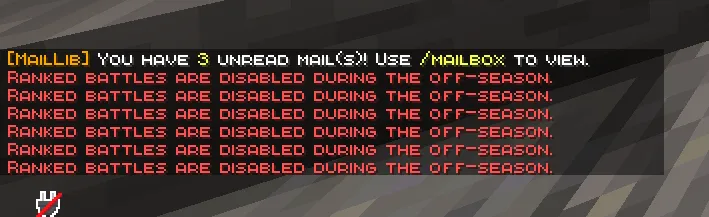
I can't queue for ranked during the off-season
That’s by design. While no season is running, ranked queue entry is blocked (casual battles stay open). Once a new season starts, ranked opens again.
📈 Rating & Ranks
What are the rank tiers?
Six tiers, named after Poké Balls, climbed in order:
| Tier | Rating (Pokémon Showdown mode) |
|---|---|
| Poké Ball | 0+ |
| Great Ball | 1200+ |
| Ultra Ball | 1400+ |
| Master Ball | 1600+ |
| Beast Ball | 1800+ |
| Cherish Ball | 2000+ |
In Glicko-2 mode, separate thresholds centered on 1500 are applied automatically.
I'm worried newcomers will tank their rating and get stuck
They won’t. At low ratings the system is asymmetric: you gain more on a win than you lose on a loss (matching Pokémon Showdown). Newcomers climb steadily instead of spiraling.
My rating didn't change after a battle
Common causes:
- It was a casual battle (
/casual); rating doesn’t move there. - You hit the daily rating-gain cap. Losses are never capped.
- The match didn’t finish cleanly (disconnect, etc.).
I want to reset ratings
For one player: /rankedadmin setelo <player> <format> <elo>. For everyone at once (new-season reset), use onSeasonEnd in Season settings and pick a hard reset or a partial (soft) reset.
🎁 Rewards & Seasons
Season-end rewards aren't delivered
- Make sure MailLib is installed. Rewards go out through the mailbox.
- Check that reward commands are set in
rewards.yamlor your season preset. - Players claim with
/mailbox. Rewards for offline players land on their next login.
How do players claim rewards?
/mailboxOpen the mailbox and claim.
Can I give economy money (Impactor, Vault, Essentials) as a reward?
Yes. Any economy plugin/mod with a money command works — put its command in the reward lists (battle.yaml → rewards for per-match, rewards.yaml / season presets for season-end):
# battle.yaml — Impactor (Fabric)
rewards:
  victoryCommands:
    - "eco deposit 1000 {player}"

# battle.yaml — Vault/Essentials (Arclight)
rewards:
  victoryCommands:
    - "eco give {player} 1000"
Casual matches have their own lists (casualVictoryCommands / casualDefeatCommands) — keep those lighter, since casual games are high-frequency.
Do casual battles give rewards too?
Only if you configure them. casualVictoryCommands / casualDefeatCommands in battle.yaml are empty by default. Missions (/missions) can also be configured for casual play. See Victory/Defeat Rewards.
The season doesn't end automatically
- Check the end date/time and timezone in
season.yaml(IANA format, e.g.Asia/Tokyo). - Rotate manually with
/rankedadmin season rotate. - If the server was offline when the season changed, it’s detected and applied on the next startup.
⚙️ Configuration & Operation
I edited a config but it's not applied
Run /rankedadmin reload. On cross-server setups, every server needs a reload or restart.
"This team is invalid for this format"
The team tripped a blacklist, a label limit, a duplicate rule, or the active season’s move rules. The detailed error identifies the Pokémon and move when a learnset check fails. See Blacklist configuration and Old Moves and National Dex.
I want to lock a specific player out of ranked
/rankedadmin banranked <player> bans them from ranked (requires LuckPerms; casual still allowed). Lift it with /rankedadmin unbanranked <player>.
I want to clear a player's disconnect penalty
/rankedadmin clearpenalty <player>Can I use other languages like Portuguese or Chinese?
Yes. Add a language file under config/cobbleranked/language/ and set language to match. Any language works. See Languages.
🌐 Cross-Server
What do I need for cross-server?
- A shared database (MySQL or MongoDB; SQLite is single-server only).
- Redis for queue sync.
- A proxy (Velocity or BungeeCord) for player transfers.
Steps are in Cross-Server Setup.
Redis won't connect
- Is Redis running? (
redis-cli pingshould returnPONG.) - Are the host, port, and password in
config.yamlcorrect? - Is port 6379 open in your firewall?
Ratings aren't shared across servers
Make sure every server points at the same database. SQLite is per-server, so it can’t back a cross-server setup.
🆘 Still stuck?
- Follow Troubleshooting.
- Check
logs/latest.logfor errors. - Have the relevant config files ready.
- Ask in Discord under #feedback.